The Resources page
Resources is the first page you see after signing in. It lists every AWS resource you are allowed to see, across every connected account and region, and is where you start, stop, keep on and tag them.
You only see what an access rule shows you. Administrators see everything. If no rule covers you yet, the page says so and offers Request access (see Requesting access).
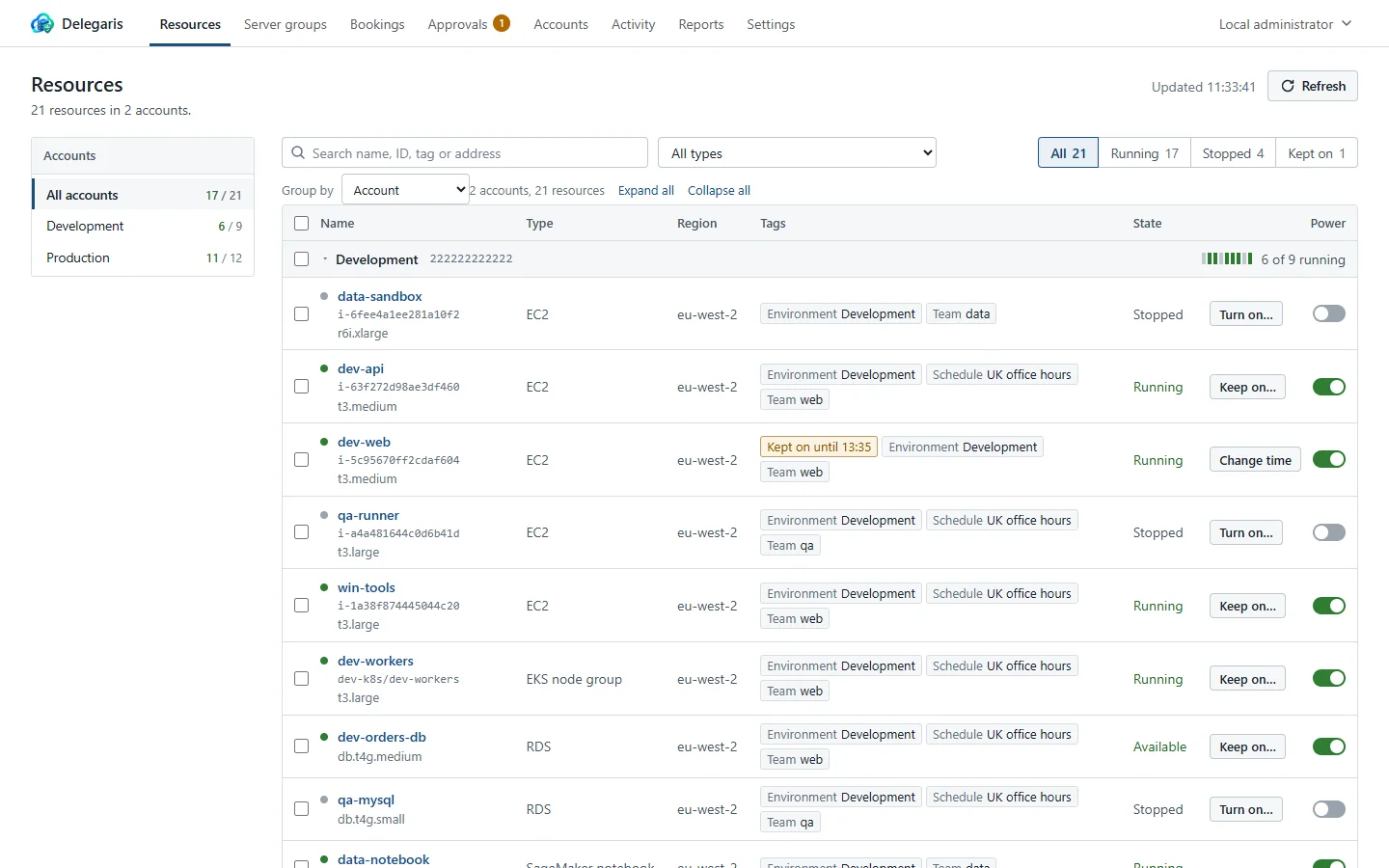
The top of the page
The heading says how many resources you can see and in how many accounts. On the right:
- Request access - for anyone who is not an administrator.
- Updated and a time - when the list was last read from AWS.
- Refresh - reads the list from AWS again now.
The list also refreshes itself: every 30 seconds or so, and every few seconds while something is changing state or just after you have done something. It does not refresh while the browser tab is hidden.
If some accounts could not be read, a warning says the list may be incomplete. Administrators see which account and region failed and why.
If a keep-on you set is about to end, a warning at the top names the machines and when they will be stopped (or go back on schedule), with a Change the time link. This is the same warning Slack sends.
Accounts and grouping
The account rail
When you can see more than one account, a column on the left lists them under Accounts, each with two numbers: how many of its resources are running, and how many there are in all. All accounts is at the top. Click an account to show only its resources. With more than eight accounts, a Find an account box appears above the list.
On a narrow screen the rail is replaced by an account drop-down beside the search box.
Bands and folding
The list is divided into bands. Each band has a heading row with the band's name, a row of marks (one per resource, lit when running), and "n of m running". Click the heading to fold or unfold it. A folded band shows a summary instead, such as "3 running, 2 stopped, 1 kept on, 1 waiting for approval".
Expand all and Collapse all open or close every band at once.
With more than five bands, every band starts folded, so a large estate opens as a short list of accounts with counts rather than a wall of machines. Typing in the search box opens them all.
Group by
Group by chooses how the list is divided:
| Choice | Bands |
|---|---|
| Account | One per AWS account (the default) |
| Region | One per region |
| Key tag | One per value of that tag, plus "No Key tag" for resources without it |
The tags offered are the ones most of your resources carry (up to six). Your browser remembers the choice.
Search and filters
The search box (Search name, ID, tag or address) matches resource names, IDs, account names and IDs, regions, states, types, tag keys and values, friendly names for tag values, and the details shown for each resource, such as IP addresses and sizes. Type several words to find resources that match all of them. Typing kept on finds everything currently kept on.
Beside the search box:
- All types narrows the list to one kind of resource, such as EC2 instances or Auto Scaling groups. It only appears when there is more than one kind.
- The state buttons: All, Running and Stopped, each with a count. Changing appears while anything is starting or stopping, and Kept on while anything is being kept on past its schedule.
- Clear filters appears whenever a filter is set.
The columns
| Column | What it shows |
|---|---|
| Name | The resource's name (its Name tag, or its ID if it has none), a coloured dot for its state, and under it the ID and size |
| Type | EC2, RDS, Aurora cluster, Auto Scaling group, ECS service and so on |
| Region | The AWS region |
| Tags | Up to three tags, with friendly names where they have one, and "n more" for the rest. Special labels appear here too: Kept on until a time, Waiting for approval, and "Key dropped" for a tag that has been dropped |
| State | The state AWS reports, such as Running, Stopped, Available or Stopping |
| Power | The power switch, and the Keep on… button where you can use it |
See Starting, stopping and rebooting for the power switch and Keeping on for Keep on….
Selecting several resources
Tick the box beside a resource to select it. The box in a band's heading selects everything in that band, and the box in the table heading selects everything shown.
While anything is selected, a bar appears at the bottom of the page with "n resources selected" and these actions:
| Action | What it does |
|---|---|
| Start n | Starts the selected resources that are stopped and that you may start |
| Stop n | Stops the selected resources that are running and that you may stop, after asking you to confirm |
| Keep on until… or Turn on until… | Keeps the selected resources on until a time (see Keeping on) |
| Reboot n | Reboots the running ones you may reboot, after asking you to confirm |
| Drop tag | Drops a tag from every selected resource that has it and where you may manage it |
| Re-add tag | Puts back a tag dropped earlier |
| Add to server group… | Administrators only. See Server groups |
| Remote Desktop… | Administrators only, when an EC2 or Lightsail instance is selected. See Remote Desktop |
| Clear selection | Unticks everything |
The number on each button is how many of the selection it applies to. Resources it does not apply to are left alone, so you can select a mixed set and press Start without picking out the ones already running.
The detail panel
Click a resource's name to open its detail panel below the row. Click it again to close it. The panel has these parts, top to bottom.
Protected notice
If the resource is protected, a notice says only administrators can start, stop or change it.
Schedule line
A line with a clock that says where the resource stands:
- On its schedule: the friendly name of its schedule, with the hours where they are known, and when it normally stops or starts next. Times are on your own clock; if the schedule runs on a different time zone, "your time" is added.
- Off its schedule: the schedule tag has been dropped and nothing will put it back.
- Not on a schedule: it can still be turned on for a set time and is stopped again afterwards.
- Kept on until a time, by whom, what happens at the end, and why.
The line carries the keep-on buttons: Keep on until… or Turn on until…, and for a keep-on in progress Change time (or Extend), Stop it now and Put back on schedule. See Keeping on.
Action buttons
Depending on your access and the resource, a row of buttons:
- Remote Desktop - downloads a Remote Desktop file. See Remote Desktop.
- Book ahead… - see Booking ahead.
- Reboot - for a running resource you may reboot. See Starting, stopping and rebooting.
- Set up Remote Desktop… or Remote Desktop settings… - administrators only, on EC2 and Lightsail instances.
Booked
Any keep-ons booked ahead for this resource, who booked them, and when the next one starts, with Cancel for your own (administrators can cancel any).
Tags
Every tag on the resource, with its friendly name and the value in AWS. Tags you may manage have Drop and Change buttons, dropped tags are shown struck through with Re-add, and a form at the bottom sets a new tag. Tags starting with aws: are listed separately under "n tags managed by AWS" and cannot be changed. See Tags.
Details
| Item | Shown for |
|---|---|
| Account, Region, ID | Everything |
| Cost | Resources AWS publishes a price for: "About $0.19 an hour while running (on-demand list price, before discounts)". See Cost estimates |
| Its schedule saves | Priced resources whose schedule hours are known: "About $22 a week" |
| Starts at | Auto Scaling groups, ECS services and EKS node groups that are stopped: the size a start brings back |
| Size, Engine, Availability zone, Private IP, Public IP, Platform, Purchase option, Multi-AZ | Instances and databases, as AWS reports them |
| Auto Scaling group | EC2 instances that belong to one |
| Instances in cluster | Aurora, DocumentDB and Neptune clusters |
| Capacity, Instances in service, Tasks, Launch type, Cluster, Nodes, Health | Scaled services and clusters, where they apply |
When the list is empty
- An administrator with no accounts connected sees Add an account. See Adding accounts.
- An administrator whose accounts have nothing in their regions sees Check accounts and regions.
- Anyone else sees that they have no access yet. Their groups are listed under their name, top right, which helps an administrator write the right rule.